





Key takeaways:
- ERP implementation and integration connect your ERP system with business applications like CRM, HRMS, accounting, inventory, and eCommerce to enable seamless data exchange.
- It is responsible for digital transformation and eliminates data silos, automates workflows, and ensures real-time synchronization across all connected systems.
- Businesses benefit from improved data accuracy, productivity, decision-making, and operational efficiency while reducing manual work and costly errors.
- Common integration methods include APIs, middleware, iPaaS, ETL, webhooks, and custom connectors, each suited to different business needs.
real-time data sharing, workflow automation, and improved operational efficiency. By selecting the right integration method, following best practices, implementing robust security measures, and partnering with the best ERP Software development company, businesses can eliminate Enterprise Resource Planning (ERP) systems help businesses centralize operations, but their true value is unlocked when they seamlessly connect with the other software your teams rely on every day.
ERP integration eliminates data silos, automates workflows, and enables real-time information sharing across departments, leading to faster decisions and greater operational efficiency. Whether you’re integrating CRM, accounting, inventory, HR, or eCommerce platforms, choosing the right integration strategy can transform how your business operates and scales. In this informative guide, you’ll learn what ERP integration is, how it works, its key benefits, common integration methods, costs, challenges, and best practices to help you build a connected, future-ready business.
What Is ERP Integration?
Enterprise resource planning integration is the process of connecting your central ERP database with other business applications (like CRM, e-commerce, or supply chain software). This enables seamless data exchange, automates workflows, and eliminates manual data entry to create a single source of truth across all departments.
Key Benefits:
- Eliminates Data Silos: Business system integration keeps all business systems connected with a single source of truth.
- Boosts Automation: Reduces manual data entry and minimizes errors by automatically syncing data.
- Real-Time Visibility: Provides instant access to accurate business and operational data.
How Does ERP Integration Work?
ERP integration connects your ERP system with other business applications using APIs, middleware, or custom connectors. When data is created or updated in one system, it is automatically synchronized with the ERP and other connected applications, ensuring consistent, real-time information across the organization.
Here’s how the ERP software integration process works:
- Data is created in a connected application (CRM, eCommerce, POS, etc.).
- APIs or Middleware solutions capture and transfer the data to the ERP system.
- The ERP processes and stores the information in a central database.
- Connected systems are updated automatically with real-time data.
Example Workflow:
Customer Order → eCommerce Platform → API/Middleware → ERP System → Inventory Update → Accounting Update → Shipping Notification → Order Confirmation to Customer
Answer a few quick questions and our experts will share a tailored project estimate.
Why Businesses Should Invest in ERP Integration?
ERP integration helps businesses connect their critical applications, automate workflows, and ensure data flows seamlessly across departments. Here are the reasons why investing in ERP integration is a great idea for businesses.
1. Eliminates Data Silos
ERP integration connects all business applications, creating a single source of truth. This ensures every department works with accurate, up-to-date information, reducing inconsistencies and improving collaboration across the organization.
2. Automates Business Processes
By automating data exchange between systems, ERP integration solutions reduce manual data entry, minimize human errors, and accelerate workflows, allowing employees to focus on strategic tasks instead of repetitive administrative work.
3. Improves Data Accuracy
Real-time synchronization keeps information consistent across CRM, accounting, inventory, and other systems. This reduces duplicate records, prevents costly mistakes, and ensures reliable data for reporting and decision-making.
4. Provides Real-Time Business Insights
ERP system integration gives leaders instant access to operational and financial data through centralized dashboards, enabling faster, data-driven decisions and helping businesses respond quickly to changing market conditions.
5. Enhances Customer Experience
ERP integration streamlines order processing, inventory updates, billing, and customer support, ensuring faster response times, accurate order fulfillment, and a seamless experience that improves customer satisfaction and loyalty.
Industry Insights: Business Markets Insights
The global cloud ERP market size is projected to grow from USD 76.17 billion in 2026 to USD 207.59 billion by 2034, registering a CAGR of 13.40% over the forecast period.
What are the Different Types of ERPs?
Businesses can choose from several ERP integration methods based on their infrastructure, scalability requirements, and budget. Here are the most common types:
1. API Integration
Experts who provide ERP Software development services provide API integration, which connects ERP systems with other applications through Application Programming Interfaces (APIs), enabling secure, real-time data exchange. It is the most popular integration method for modern cloud-based businesses due to its speed, flexibility, and scalability.
- Development Complexity: Medium
- Estimated Cost: $5,000–$20,000+
- Best For: Real-time integrations between cloud applications.

2. Middleware Integration
Middleware acts as a bridge between the ERP system and multiple business applications. Middleware enterprise software integration simplifies data exchange, manages complex workflows, and reduces the need for individual connections. It makes it ideal for organizations with diverse software ecosystems.
- Development Complexity: Medium to High
- Estimated Cost: $20,000–$40,000+
- Best For: Mid-sized and enterprise businesses with multiple software systems.
3. Point-to-Point Integration
Point-to-point integration creates a direct connection between two applications. While it is simple and cost-effective for small businesses with limited systems, managing multiple connections becomes difficult as the organization grows.
- Development Complexity: Low
- Estimated Cost: $2,000–$10,000 per connection
- Best For: Small businesses with limited integration needs.
4. ESB (Enterprise Service Bus) Integration
An Enterprise Service Bus (ESB) provides a centralized communication layer that connects multiple applications and services. It is commonly used by large enterprises that require reliable, secure, and highly scalable integrations across complex IT environments.
- Development Complexity: High
- Estimated Cost: $20,000–$50,000+
- Best For: Large enterprises with complex IT ecosystems.
5. iPaaS (Integration Platform as a Service)
iPaaS is a cloud-based integration solution that enables businesses to connect applications using pre-built connectors and low-code tools. Cloud ERP integration accelerates deployment, reduces development effort, and supports seamless integration across cloud and on-premise systems.
- Development Complexity: Low to Medium
- Estimated Cost: $5,000–$18,000 for implementation
- Best For: Cloud-first businesses seeking rapid deployment.
6. Database Integration
Database integration allows multiple applications to share and synchronize data directly through a common database or database replication. It is useful for internal systems that require consistent and centralized access to business data.
- Development Complexity: Medium
- Estimated Cost: $10,000–$30,000+
- Best For: Internal enterprise systems with shared databases.
Common Systems You Can Integrate with ERP
ERP systems deliver maximum value when they seamlessly connect with other business applications. ERP Software development solution providers add these systems to eliminate data silos, automate workflows, and ensure consistent, real-time information across your organization.
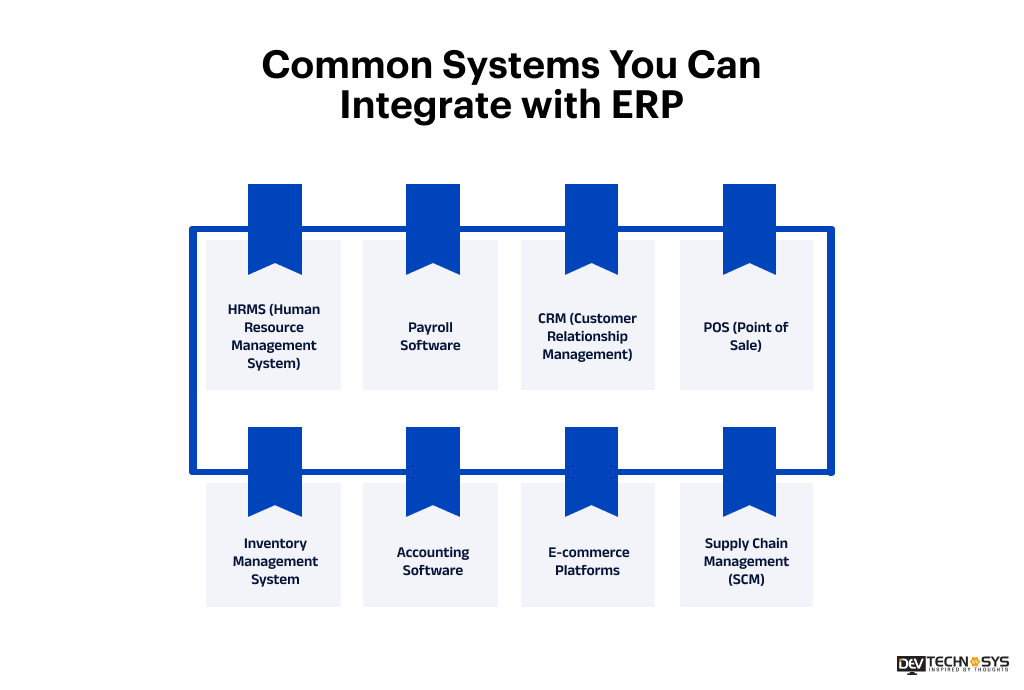
- HRMS (Human Resource Management System): An HRMS integration connects employee records, attendance, leave management, and performance data with your ERP, simplifying workforce management and administrative tasks.
- Payroll Software: ERP integration services involve payroll integration that automates salary calculations, tax deductions, reimbursements, and employee payments by syncing HR and financial data, reducing errors and ensuring timely payroll processing.
- CRM (Customer Relationship Management): Build a custom ERP solution with CRM Integration to synchronize customer data, sales orders, invoices, and support information, helping sales and customer service teams deliver a seamless customer experience.
- POS (Point of Sale): Connecting a POS system with ERP enables real-time synchronization of sales, inventory, pricing, and customer transactions, helping retailers maintain accurate stock levels and financial records.
- Inventory Management System: Inventory integration automatically updates stock levels, purchase orders, warehouse data, and product availability across all connected systems, improving inventory accuracy and reducing stockouts.
- Accounting Software: Integrating accounting software with ERP streamlines financial processes by automatically syncing invoices, payments, expenses, and general ledger data, improving financial visibility and compliance.
- E-commerce Platforms: Custom ERP integration with e-commerce platforms synchronizes product catalogs, inventory, customer information, pricing, and orders, ensuring efficient order fulfillment and a consistent shopping experience.
- Supply Chain Management (SCM): Supply chain integration connects procurement, warehouse operations, Logistics ERP integration, and supplier information with your ERP, improving demand planning, shipment tracking, and overall supply chain efficiency.
Industry Insights: Mordor Intelligence
Mid-market merchants are increasingly transitioning from outdated on-premise Enterprise Resource Planning (ERP) systems to modern cloud-based suites such as SAP S/4HANA Cloud, Oracle NetSuite, and Microsoft Dynamics 365
What are the Key Benefits of ERP Integration?
ERP integration connects your business applications into a unified ecosystem, allowing data to flow seamlessly across departments. This improves efficiency, eliminates manual processes, and gives teams access to accurate information for faster, smarter decisions.
- Single Source of Truth: Centralizes data from all connected systems, ensuring every department accesses accurate, consistent, and up-to-date information for smoother collaboration and operations.
- Better Decision Making: Provides real-time business insights and analytics, enabling leaders to make faster, data-driven decisions based on accurate operational and financial information.
- Real-Time Data: Automatically synchronizes information across connected applications, ensuring inventory, sales, customer, and financial data remain accurate and always up to date.
- Reduced Manual Work: Automates repetitive data entry and routine workflows, minimizing human errors, saving time, and allowing employees to focus on higher-value business tasks.
- Increased Productivity: Streamlines workflows by connecting business systems, reducing process delays, improving collaboration, and helping teams complete tasks more efficiently every day.
- Faster Reporting: Consolidates data from multiple systems into one platform, enabling businesses to generate accurate reports quickly for better analysis and strategic planning.
ERP Integration Use Cases Across Industries
ERP integration helps organizations streamline operations, improve data accuracy, and automate workflows across departments. Here are some common industry-specific use cases:
Industry |
ERP Integration Example |
Key Benefits |
| Manufacturing ERP integration | ERP + Inventory + MES + Supply Chain | Optimized production planning, inventory control, and procurement. |
| Retail ERP integration | ERP + POS + eCommerce + CRM | Real-time inventory updates, seamless order processing, and improved customer experience. |
| Healthcare ERP integration | ERP + EHR + Billing + HRMS | Centralized patient, financial, and workforce management with improved compliance. |
| Logistics | ERP + WMS + TMS + Fleet Management | Better shipment tracking, warehouse efficiency, and route optimization. |
| Finance | ERP + Accounting + Payroll + Banking Systems | Automated financial reporting, faster reconciliation, and regulatory compliance. |
| Education | ERP + Student Information System + LMS + HRMS | Simplified student administration, finance management, and staff operations. |
| Hospitality | ERP + PMS + Booking Engine + POS | Streamlined reservations, billing, inventory management, and guest services. |
| Construction | ERP + Project Management + Procurement + Payroll | Improved project tracking, budget control, resource allocation, and procurement. |
| Automotive | ERP + CRM + Inventory + Manufacturing Systems | Efficient production planning, dealer management, and supply chain visibility. |
| Food & Beverage | ERP + POS + Inventory + Supply Chain | Better inventory tracking, demand forecasting, quality control, and order fulfillment. |
ERP Integration Methods: A Detailed Comparison
The right integration method depends on how quickly data needs to be synchronized, the complexity of your IT environment, and your long-term scalability goals. Below is an overview of the most common ERP integration methods.
Integration Method |
Real-Time |
Cost |
Maintenance |
Best For |
| APIs | Yes | Medium | Low | Real-time cloud integrations |
| Webhooks | Yes | Low | Low | Event-driven automation |
| Middleware | Yes | High | Medium | Enterprise system integration |
| ETL (Extract, Transform, Load) | No | Medium | Medium | Data migration & reporting |
| Flat Files (CSV/XML/JSON) | No | Low | High | Legacy system integration |
| Custom Connectors | Yes | High | High | Custom business workflows |

Best Technology Stack for ERP Integration
Selecting the right technology stack is essential for building a secure, scalable, and high-performing ERP integration solution. Your ERP integration partner will select a stack that enables seamless communication between business applications, supports real-time data synchronization, and simplifies long-term maintenance. The technologies you choose should align with your ERP platform, integration requirements, and future business growth.
Layer |
Technologies |
| Frontend | React.js, Angular, Vue.js |
| Backend | Node.js, Java (Spring Boot), .NET, Python (Django/FastAPI) |
| API Frameworks | REST APIs, GraphQL, SOAP |
| Integration Platforms | MuleSoft, Boomi, Apache Camel, WSO2, Azure Logic Apps |
| iPaaS Solutions | Workato, Celigo, Zapier, Make (Integromat) |
| Message Queues | Apache Kafka, RabbitMQ, Amazon SQS |
| Database | PostgreSQL, MySQL, Microsoft SQL Server, Oracle Database |
| Cloud Platform | AWS, Microsoft Azure, Google Cloud Platform (GCP) |
| Authentication & Security | OAuth 2.0, JWT, SAML, OpenID Connect |
| Monitoring & Logging | Prometheus, Grafana, ELK Stack, Datadog |
| DevOps & CI/CD | Docker, Kubernetes, Jenkins, GitHub Actions |
| ERP Systems | SAP S/4HANA, Oracle NetSuite, Microsoft Dynamics 365, Odoo, ERPNext |
ERP Integration Security Best Practices
According to a custom software development company, securing ERP integrations is essential to protect sensitive business data, prevent cyber threats, and maintain compliance with industry regulations. The following best practices help ensure secure and reliable data exchange across connected systems.
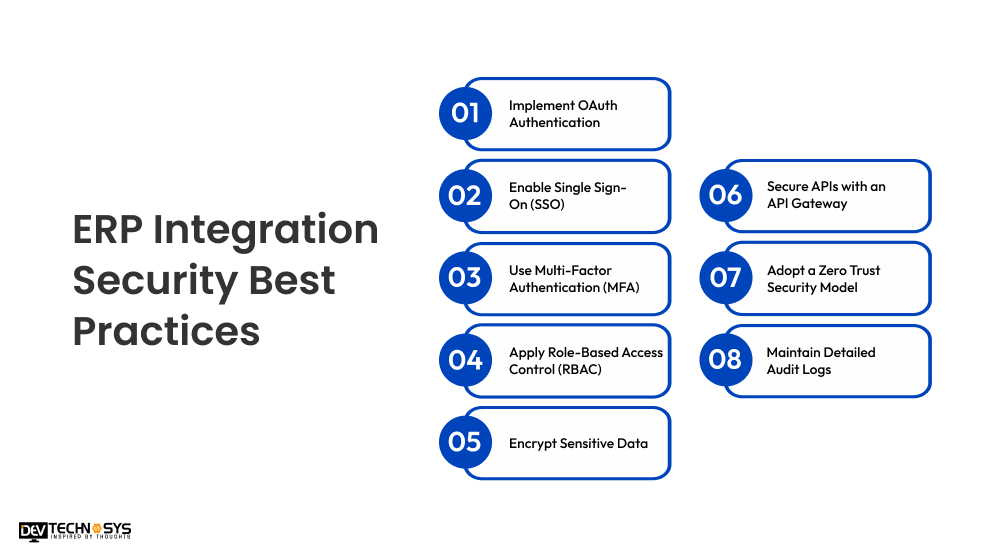
1. Implement OAuth Authentication
Use OAuth 2.0 to secure API access through token-based authentication, allowing applications to communicate safely without exposing user credentials or compromising sensitive ERP data.
2. Enable Single Sign-On (SSO)
Implement Single Sign-On (SSO) to let users access multiple connected applications with one secure login, simplifying authentication while improving security and reducing password-related risks.
3. Use Multi-Factor Authentication (MFA)
Require users to verify their identity using multiple authentication factors, such as passwords and one-time codes, adding an extra layer of protection against unauthorized access.
4. Apply Role-Based Access Control (RBAC)
Assign permissions based on user roles to ensure employees access only the data and functions required for their responsibilities, reducing security risks and insider threats.
5. Encrypt Sensitive Data
Encrypt business data both in transit and at rest to protect confidential information from cyberattacks, unauthorized access, and data breaches across connected ERP systems.
6. Secure APIs with an API Gateway
Deploy an API gateway to authenticate requests, manage traffic, enforce security policies, monitor API activity, and protect backend ERP services from malicious attacks.
7. Adopt a Zero Trust Security Model
Continuously verify every user, device, and application before granting access, ensuring no entity is trusted by default, regardless of its network location.
8. Maintain Detailed Audit Logs
AI in ERP implementation enables the platform to record user activities, system changes, and API transactions, thereby detecting suspicious behavior, simplifying troubleshooting, supporting compliance audits, and strengthening overall system accountability.
Popular ERP Systems That Support Integration
Modern ERP platforms offer built-in APIs, connectors, and integration frameworks that simplify communication with CRM, accounting, HR, eCommerce, and other business applications. The right ERP depends on your business size, industry, and integration requirements.
ERP System |
Best For |
Integration Options |
| SAP S/4HANA | Large enterprises | REST API integration, OData, SAP Integration Suite, BTP, Middleware |
| Oracle NetSuite | Growing SMBs & enterprises | SuiteTalk APIs, REST APIs, SOAP APIs, iPaaS, Celigo |
| Microsoft Dynamics 365 | Mid-sized to enterprise businesses | Microsoft Power Platform, REST APIs, Azure Logic Apps, Power Automate |
| Odoo | Small & medium businesses | REST/XML-RPC APIs, Odoo Connectors, Custom APIs |
| ERPNext | Startups & SMBs | REST APIs, Webhooks, Frappe Framework APIs |
| Acumatica | Distribution, retail & manufacturing | REST APIs, SOAP APIs, OData, iPaaS |
| Infor | Manufacturing & supply chain enterprises | Infor ION, REST APIs, Middleware, Cloud Connectors |
| Sage Intacct | Finance-focused businesses | REST APIs, Web Services API, Salesforce Connector, iPaaS |
ERP Integration vs ERP Implementation
Although the terms ERP integration and ERP implementation are often used interchangeably, they serve different purposes. ERP implementation focuses on deploying a new ERP system, while ERP integration connects that ERP with existing business applications to enable seamless data exchange.
Aspect |
ERP Integration |
ERP Implementation |
| Purpose | Connects the ERP with other business applications | Deploys and configures a new ERP system |
| Primary Goal | Enable seamless data sharing and workflow automation | Replace or establish a centralized business management system |
| Focus | System connectivity and data synchronization | ERP installation, configuration, and customization |
| Timeline | Weeks to a few months | Several months to over a year |
| Complexity | Medium to High | High |
| Typical ERP software development cost | $5,000–$100,000+ | $30,000–$1,000,000+ |
| Business Impact | Improves efficiency and eliminates data silos | Transforms core business operations and processes |
| When It’s Needed | When existing systems need to exchange data with the ERP | When adopting or replacing an ERP solution |
| Outcome | Connected applications with real-time data synchronization | A fully operational ERP system supporting business functions |
Signs Your Business Needs ERP Integration
If your business relies on multiple disconnected systems, it may be time to invest in ERP integration. The following signs indicate that connecting your applications can improve efficiency, data accuracy, and overall business performance.
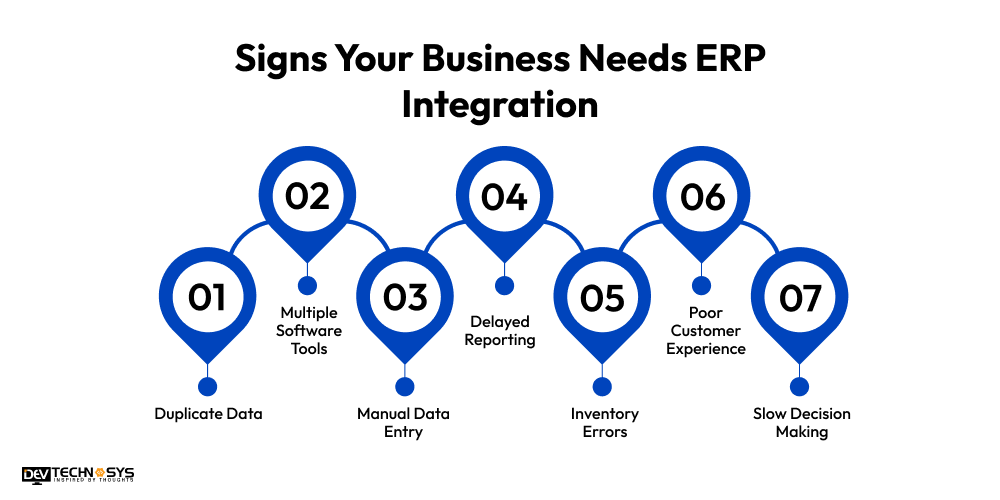
1. Duplicate Data
If employees repeatedly enter the same customer, inventory, or financial information into multiple systems, your business is likely experiencing data duplication, inconsistencies, and unnecessary manual work that affects operational efficiency.
2. Multiple Software Tools
Using separate applications for CRM, accounting, inventory, HR, and sales without seamless connectivity creates data silos, making collaboration difficult and increasing the chances of errors across departments.
3. Manual Data Entry
If your team spends hours transferring information between different systems, manual processes are slowing operations, increasing human errors, and preventing employees from focusing on higher-value business activities.
4. Delayed Reporting
When business reports require collecting and consolidating data from multiple disconnected applications, decision-makers cannot access timely insights needed to respond quickly to operational or market changes.
5. Inventory Errors
Frequent stock discrepancies, overselling, stockouts, or inaccurate inventory records often indicate that your inventory system is not synchronized with your ERP or other business applications.
6. Poor Customer Experience
Delayed order processing, incorrect customer information, inconsistent pricing, or slow support responses often result from disconnected systems that prevent teams from accessing accurate, real-time business data.
7. Slow Decision Making
Without real-time data synchronization, managers rely on outdated or incomplete information, making it difficult to identify trends, optimize operations, and make informed business decisions quickly.
Industry Insights
According to Market Research Future, the integration of AI and automation is reshaping ERP capabilities, enhancing efficiency and decision-making.
ERP Integration Checklist Before You Start
A successful ERP integration begins with careful planning. Reviewing the following checklist before implementation helps reduce risks, avoid costly delays, and ensure your integration project delivers long-term business value.
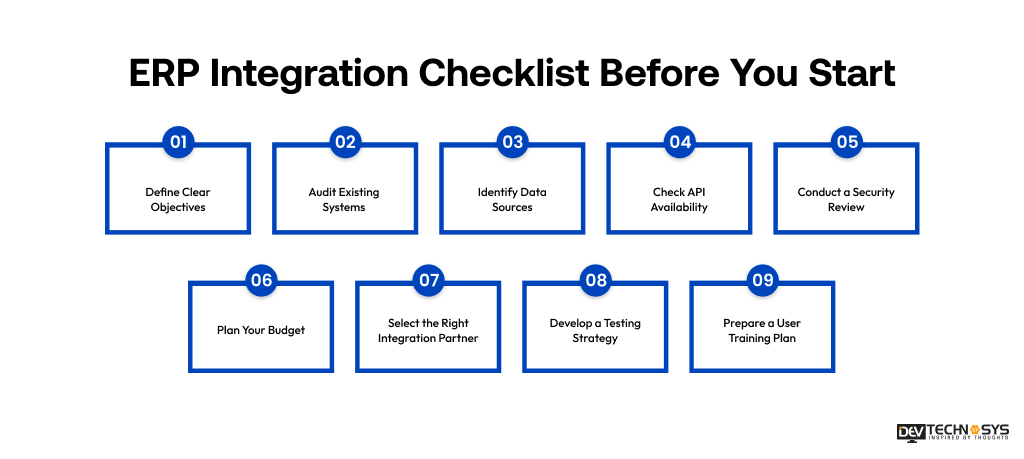
1. Define Clear Objectives
Establish the goals of your ERP integration, such as automating workflows, improving data accuracy, reducing manual work, or enabling real-time reporting across business departments.
2. Audit Existing Systems
Evaluate your current software, databases, and business applications to identify compatibility issues, integration requirements, and opportunities for process improvement before implementation begins.
3. Identify Data Sources
List all systems that will exchange data with your ERP, including CRM, HRMS, accounting, inventory, eCommerce, and third-party applications, to ensure complete data synchronization.
4. Check API Availability
Verify whether your ERP and connected applications provide secure APIs, webhooks, or integration connectors that support reliable and scalable data exchange.
5. Conduct a Security Review
Assess authentication methods, encryption standards, access controls, and compliance requirements to protect sensitive business data throughout the integration lifecycle.
6. Plan Your Budget
Estimate costs for development, integration tools, licensing, testing, maintenance, and future upgrades to avoid unexpected expenses during the project.
7. Select the Right Integration Partner
Choose an experienced ERP integration provider with proven technical expertise, industry knowledge, and post-deployment support to ensure a successful implementation.
8. Develop a Testing Strategy
Plan comprehensive functional, performance, security, and user acceptance testing to verify accurate data synchronization and resolve issues before deployment.
9. Prepare a User Training Plan
Train employees on new workflows, integrated systems, and best practices to encourage user adoption, minimize disruption, and maximize the value of your ERP integration.
Conclusion
ERP integration connects your business applications into a unified ecosystem, enabling data errors and fraud, and builds a scalable foundation for long-term growth. Whether you are integrating CRM, accounting, eCommerce, HR, or supply chain software, a well-planned ERP integration improves operational efficiency, data accuracy, and decision-making.
If you are a business wanting to enter this competitive market with your own ERP software, partner with an experienced ERP Software development company like Dev Technosys UAE. With over 15 years of experience and support from 150+ skilled experts, we ensure a secure, reliable, and future-ready solution tailored to your business needs.
FAQs
Q1. Why Is ERP Integration Important?
ERP integration improves operational efficiency by eliminating data silos, reducing manual data entry, and providing real-time visibility into business operations. It also enhances collaboration, supports informed decision-making, and delivers a better customer experience.
Q2. What Systems Can Be Integrated With An ERP?
An ERP system involves third-party software integration with CRM, HRMS, payroll, accounting software, inventory management, POS systems, eCommerce platforms, supply chain solutions, payment gateways, and other third-party applications to streamline business operations.
Q3. What Are The Main Types Of ERP Integration?
The most common ERP integration types include API integration, middleware integration, point-to-point integration, ESB, iPaaS, database integration, and file-based integration. Each method offers different levels of scalability, cost, and implementation complexity.
Q4. How Much Does ERP Integration Cost?
ERP integration costs typically range from $5,000 to over $20,000, depending on the number of systems, integration method, customization requirements, ERP platform, security needs, and overall project complexity.
Q5. How Long Does ERP Integration Take?
The implementation timeline varies based on project scope and complexity. Simple integrations may take a few weeks, while enterprise-level integrations involving multiple systems can require several months to complete successfully.
Q6. What Are The Biggest Challenges In ERP Integration?
Common challenges include legacy system compatibility, poor data quality, complex data mapping, security concerns, API limitations, and user adoption. Proper planning, testing, and monitoring help overcome these issues effectively.